
Ideal when you are at the TV with the remote. You can send photos and get quick replies, which suits a fix done one setting at a time.
Contact
Contact 4K IPTV Premium: WhatsApp or email, 24/7
The 4K IPTV Premium team answers on WhatsApp and at contact@4kiptv-premium.co.uk around the clock, in English. You can write before ordering, in the middle of a setup or near the end of a plan; it is always the same team on the other end.
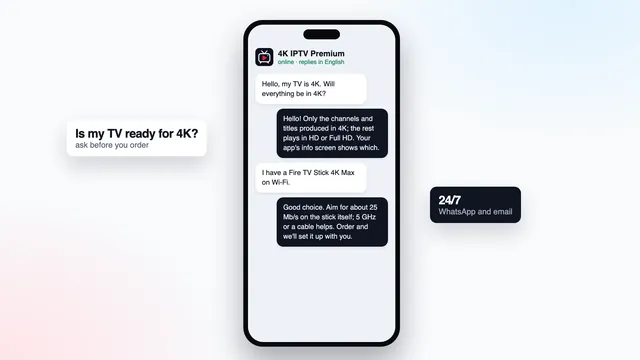
Get in touch
Two ways to reach us
Ideal when you want a written record: refunds, receipts, dates. Our address is contact@4kiptv-premium.co.uk.
Ordering
Orders begin on a plan card rather than here. Every Buy button opens WhatsApp with the chosen plan and its price filled in.
First contact
What a useful first message contains
| Subject | What to include |
|---|---|
| Questions before ordering | TV or stick model, an evening speed reading taken on it, and the number of screens that must play together |
| An order you placed | Plan name, time of payment, and the WhatsApp number or email used for the order |
| A login that fails | Device, player app, the error exactly as shown (a photo helps most) and the username in your login message |
| A picture that is not 4K yet | TV model, the streaming device and its model, the player app, the speed measured on the TV, and the resolution shown in the player’s info panel |
| A picture that pauses | Time of day it happens, the type of channel, cable or Wi-Fi, and the device’s speed at that time |
| A refund | Payment date, card or PayPal, and what went wrong, sent within 7 days of paying |
The refund rule fits in a sentence: if your login message never came, or if nothing will display on any screen after the team has helped, the refund is paid back to the same card or the same PayPal account. The refund policy has the complete terms.
When the question is about 4K, the only speed figure that counts is the one taken on the TV or stick itself; a phone near the router flatters the result. And a photo of the info panel showing the resolution says more than a paragraph of description.
Hours
Open 24/7, all year
Someone reads messages 24/7, including nights, weekends and bank holidays. Quick questions get quick answers; setup problems take a few exchanges, since every change happens on your TV and you report back.
Remote in hand? Use WhatsApp, it keeps up. Need proof of what was said, for a refund or a receipt? Email keeps a dated copy on both sides.
Put everything into one message if you can. With the details from the table, our first reply can be the actual fix rather than a list of questions.
Before you pay
Questions before ordering are welcome
Nothing has to be decided before you get in touch. Many first messages simply name a TV, give an evening speed, ask whether two rooms can watch together, or ask how the charge will look on a statement.
We answer all of it before sending any payment link. If the truthful answer is that your TV cannot run a player, or that your line will not carry 4K, we tell you, and you have spent nothing.
Rather read first? The plans page lays out the four plans with their expiry dates, and the setup page explains, device by device, how a login becomes a verified 4K picture.
Ask any seller, us included
- How many days do I have to ask for a refund?
- Where is the end date written?
- Which company takes the payment?
- Will anyone answer before I pay?
FAQ
Quick answers before you write
Is there a number I can call?
We do not take calls. Everything happens in writing, so you can send photos and keep the steps for later; WhatsApp and email are answered 24/7.
Can I ask something before I order?
Of course, and it costs nothing. Give us the TV or stick, its measured speed and the number of screens you need at once, and you will know if a plan suits you before paying.
I paid and no login message has arrived. What should I do?
Look in junk or promotions, and in the WhatsApp chat that opened from the Buy button. Then check your banking app to confirm the payment was approved. If it was and there is still nothing, send us the payment time.
My TV is 4K but the picture is not. Can you help?
Yes. Send the TV model, the streaming device and its model, the player app, the speed measured on the TV and a photo of the player’s info panel. The cause is usually one setting, one HDMI input or the programme itself.
How do I request a refund?
Email contact@4kiptv-premium.co.uk within 7 days of the payment, giving the date and what failed. The rule covers a login message that never arrived, and a login that displays nothing on any of your screens after the team’s help.
What will my bank statement say?
The payment company sets that line. Message us before you pay and we will tell you what to expect.
Ready to order? Start from a plan card
Each card shows the months, the screens and the one-off price. Its Buy button opens WhatsApp with your choice filled in, and if two plans both look right, just ask.