
HD, 1280 × 7200.9 MP
921,600 pixels. Plenty of live channels are still produced at this size; on a large screen it looks soft from the sofa.
Up to 4K UHD by source · paid once · login in 2 min
Plenty of 4K IPTV offers print “4K” across every channel. 4K IPTV Premium tells you where it is true: channels, events and titles produced in 3840 × 2160 reach a 4K screen in 4K, and the rest comes in HD or Full HD, the way it was made. Behind the login sit 40,000+ live channels with the British groups on top, 120,000 films and series, seven days of listings in UK time and catch-up where a channel keeps it.

HEVC + HDRwhen the source has them
Picture check3840 × 2160
Pixels on screen, 4K = four times Full HD
Pro 12 · 12 months£49Per month£4.08
Get Pro 12Plays in these apps



The Picture card
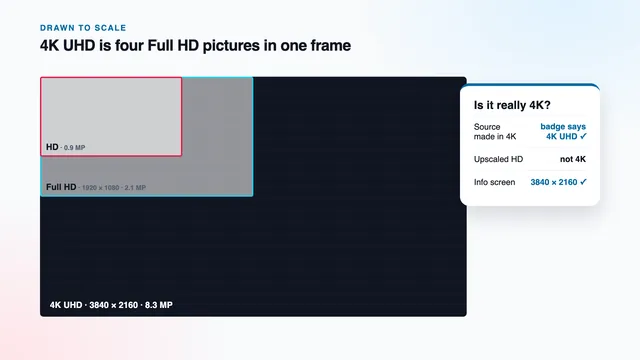
Think of the dark card beside the hero photo as a ruler. Each bar is a picture size, each line beneath it is a part your home supplies, and the rule behind 4K IPTV here fits in one line: a stream is 4K only if it was made in 4K.
921,600 pixels. Plenty of live channels are still produced at this size; on a large screen it looks soft from the sofa.
2,073,600 pixels. The everyday standard for most channels and much of any film library.
8,294,400 pixels: four times Full HD and nine times HD, all of them carrying detail only when the source was produced at this size.
The panel lights 8.3 million pixels, yet only 2.1 million carry what the camera recorded. The rest is the television’s guesswork.
The bars are drawn to scale. A 4K panel always lights all its pixels, whatever you feed it; what matters is how many of them carry recorded detail. When a Full HD channel plays on a 4K television, the set upscales it, spreading each pixel over four and filling the gaps by calculation. Good upscaling looks tidy, but it cannot invent what was never filmed. So this site calls a picture 4K only when the stream itself measures 3840 × 2160.
Two other numbers travel with resolution. HDR widens the gap between deep shadow and bright highlight, and you see it only when the programme was made in HDR, the player hands it on and your television supports that format. Frame rate is the other: much live sport is produced at 50 frames a second, and you get all 50 whenever the feed carries them. Dolby Atmos needs a programme mixed in Atmos and a soundbar or receiver that decodes it.
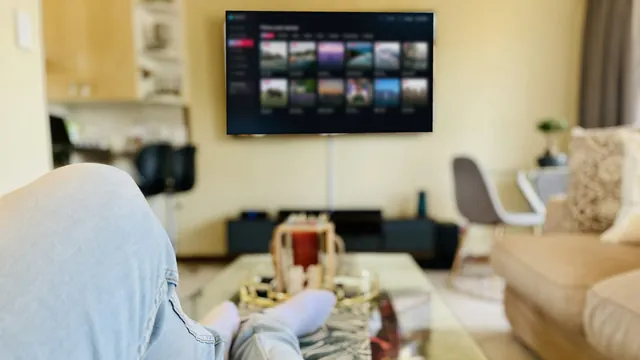 4K where the film was made in 4K
Plans
Whichever 4K IPTV plan you pick, nothing changes on the screen. Pro 3, Pro 12, Pro 12 Duo and Pro 24 open the same 40,000+ channels and 120,000 titles, and each plays 4K wherever the source is 4K. They differ in months, in screens that can play together, and so in the price of each day.
3 mo
Short
A season to check 4K on your own TV
£29.00
£9.67 for each month
Three months to see it on your screen
One stream at a time
7 days to claim a refund if nothing plays
Select Pro 3Charged once, ends on its date
Suggested plan
12 mo
Suggested
A full year, one payment
£49.00
£4.08 for each month
£67 under 4 × Pro 3
One stream at a time
7 days to claim a refund if nothing plays
Get Pro 12Charged once, ends on its date
12 mo
Two screens
Two 4K-ready screens for a year
£79.00
£6.58 for each month
£153 under 8 × Pro 3
Two streams at the same time
7 days to claim a refund if nothing plays
Select Pro 12 DuoCharged once, ends on its date
24 mo
Longest
Two years at the lowest price a month
£89.00
£3.71 for each month
£143 under 8 × Pro 3
One stream at a time
7 days to claim a refund if nothing plays
Select Pro 24Charged once, ends on its date
| Plan | Screens | Months | Per day | Per month | Price | Difference vs Pro 3 |
|---|---|---|---|---|---|---|
| Pro 3 | 1 | 3 months | £0.32 | £9.67 | £29 | — |
| Pro 12 | 1 | 12 months | £0.13 | £4.08 | £49 | saves £67 |
| Pro 12 Duo | 2 | 12 months | £0.22 | £6.58 | £79 | saves £153 |
| Pro 24 | 1 | 24 months | £0.12 | £3.71 | £89 | saves £143 |
Which plan suits your screens? Will two people ever watch different things on two televisions at the same moment? If so, pick Pro 12 Duo: two screens at once for £79 a year. Check the line first. Two screens in 4K together call for about 50 Mb/s of steady broadband, so a connection holding 35 Mb/s fits one 4K screen beside one in Full HD, not two in 4K.
For a single screen we suggest Pro 12: £49 in one go, which is £4.08 for each month or 13p for each day, and £67 below four Pro 3 orders in a row. Over two years, Pro 24 cuts the monthly cost to £3.71, the natural choice once your 4K chain already works. Pro 3, at £29, buys a season of sport and films on your own set before you commit to longer.
The player can sit on several devices around the house; on a single-screen plan they simply take turns.
The chain
A 4K IPTV picture survives only if every link passes it on. Miss one and the screen shows Full HD or less, whatever any plan promises. Here are the links, each with a number or a setting you can look up yourself.
| Link | What 4K needs | If it falls short | How you check it |
|---|---|---|---|
| Source | A channel, event or title produced at 3840 × 2160 | HD or Full HD, which is what was made | The resolution line on the player’s info screen |
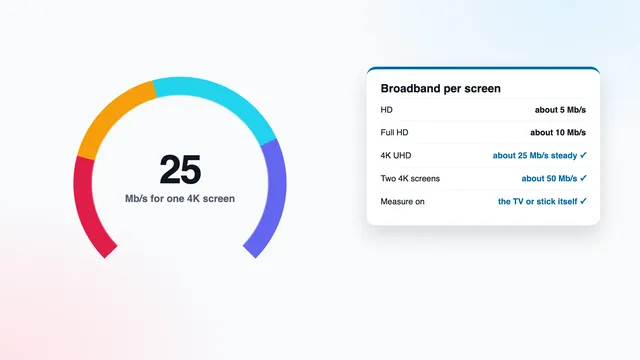
| Broadband | 25 Mb/s or so per 4K screen, without dips; 10 for Full HD, 5 for HD | A spinning wheel and restarts, mostly after 7 pm | A speed check on the playing device, after 7 pm |
| Decoding | HEVC (H.265) decoded in hardware | Stutter, a black screen, or sound with no picture | The device’s spec sheet: HEVC or H.265, and HEVC Main 10 for HDR |
| HDMI | A port and cable for HDMI 2.0 or newer | 4K capped at 30 frames, a drop to 1080p, or no HDR | The input’s label on the TV, and a cable sold as Premium High Speed or Ultra High Speed |
| Panel | A 4K (UHD) television or monitor | The picture is scaled down to the panel’s own size | The model’s specifications: 3840 × 2160 |
| HDR | HDR10, HDR10+ or Dolby Vision, when the source and the TV both support it | Standard dynamic range, which is normal for most channels | An HDR badge on the TV’s info banner |
| Frame rate | 50 fps on live sport, when the source allows | Motion that looks less fluid | 50 on the player’s info screen; Match Frame Rate on Apple TV |
Read the table from the top. The source sets the ceiling; nothing further down can raise it, and every later link can only keep the picture intact or lower it. A Full HD channel stays Full HD on the finest television, and a true 4K stream falls to 1080p the moment it crosses an old HDMI port.
Press OK or Info during playback, or open the on-screen menu. Look for 3840 × 2160 or 2160p, the codec (HEVC), the frame rate and the bitrate. That line describes the stream, not your television.
Press Info on the TV remote, or switch inputs and back. Many sets display the signal arriving, for example 3840 × 2160 and 50 Hz, plus a badge if HDR is present.
On Fire TV, Settings › Display & Sounds › Display › Video Resolution should read Auto or 4K. On Apple TV, Settings › Video and Audio › Format shows the output.
| Player info says | TV banner says | What it tells you |
|---|---|---|
| 2160p, HEVC | 3840 × 2160 | 4K all the way through: the chain is complete |
| 2160p, HEVC | 1920 × 1080 | The stream is 4K but the device output, the HDMI port or the cable holds it back |
| 1080p | 3840 × 2160 | A Full HD stream upscaled by the device: not 4K |
| 1080p | 1920 × 1080 | A Full HD source: nothing at home will change it |
Measure broadband on the device that plays, between 19:00 and 23:00, ideally on a Saturday or a big match night, when UK lines are under most strain; a reading taken at noon flatters the line. A network cable beats any wireless link. Without one, keep to the 5 GHz band within a room of the router, or add powerline or mesh units.
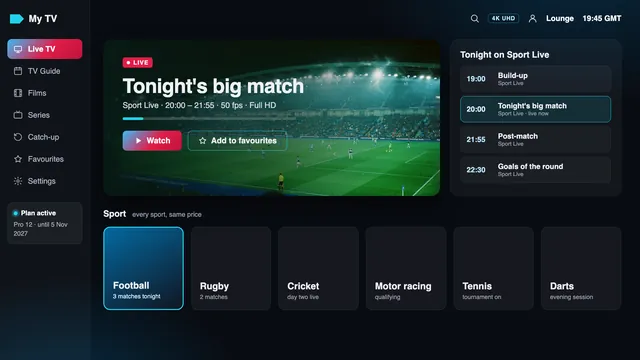
What is on
No channel names appear here, only the groups you will see once your 4K IPTV login is in the player: 40,000+ live channels, 120,000 titles on demand, a week of listings, catch-up and the 4K row.
Everything is arranged country by country, then by category, and the UK comes first: sport, news, films, entertainment, kids, documentaries, music, regional, and drama with box sets.
Each further country is split by category the same way, handy for a second language at home.
Mostly in English, others with subtitles. Titles made in 4K have a row of their own, so you know which ones will open at 2160p before pressing play.
The guide arrives with the Xtream login and follows the UK clock: GMT at present, BST once the clocks go forward in late March until they go back in late October. Listings an hour early or late? Change “EPG time offset” in the player.
Where a channel keeps recordings, the guide lets you go back, usually as far as seven days.
Darts, snooker, boxing, golf, cricket, rugby, tennis, motor racing and football: smooth at 50 frames a second if the feed has them, and in 4K if the event was produced in 4K.
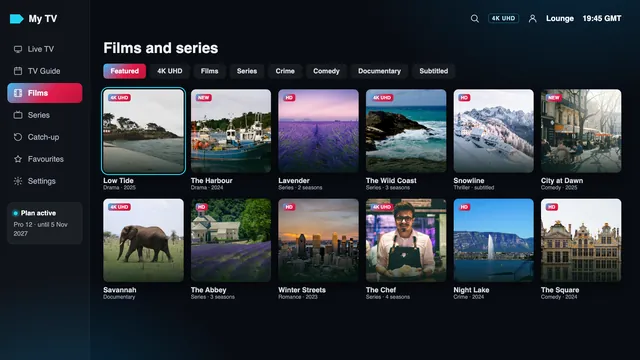
A title sits in the 4K row only when the file itself is 3840 × 2160. A film shot in 4K for the cinema can still be carried in Full HD if that is the version the source supplies, so trust the row and the badge rather than the poster.
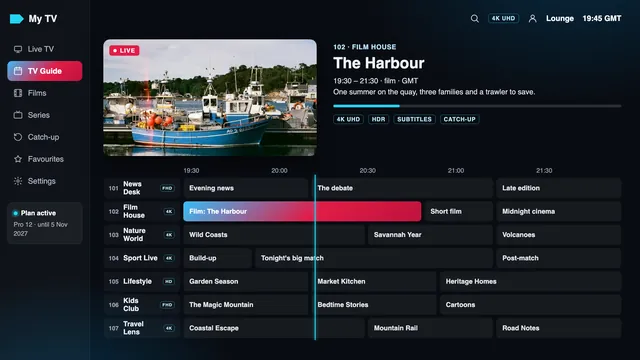
Expect live pictures to lag behind the broadcast: a few seconds at best, up to about 30 at worst. Mute the group chat on match nights if you would rather not hear about a goal before you see it.
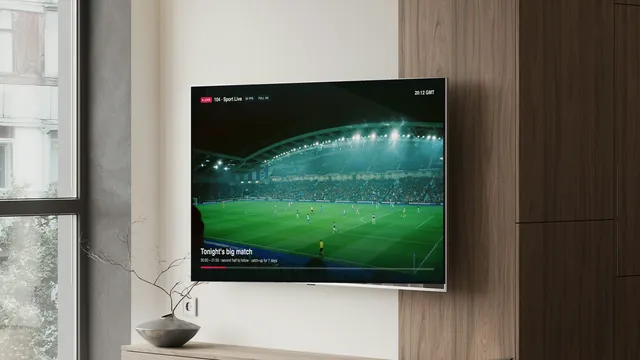 Match night: 50 fps if the feed has it
Ordering
This site has no basket, no sign-up and nowhere to type a card number. You send a message, a person answers with a secure link, and the login follows the payment.
Every plan card carries its own button, and it starts a WhatsApp chat on whichever device you are using. Email suits you better? Send the plan’s name to contact@4kiptv-premium.co.uk.
Your first message is pre-filled with the plan and the amount, such as “Pro 12 (12 months, £49)”. Add a line about your television or broadband if you want advice.
A person replies, in English, with a secure link that opens the payment company’s page. Choose card or PayPal there; your card number never reaches us.
Expect your bank to ask for a confirmation in its app, by texted code or with a card reader. If it declines, its fraud screening has usually stepped in; approving in the app or phoning the bank sorts it out.
Roughly 2 minutes once the payment clears, night or day, the login lands in that chat or in your inbox, with the plan’s end date written in it.
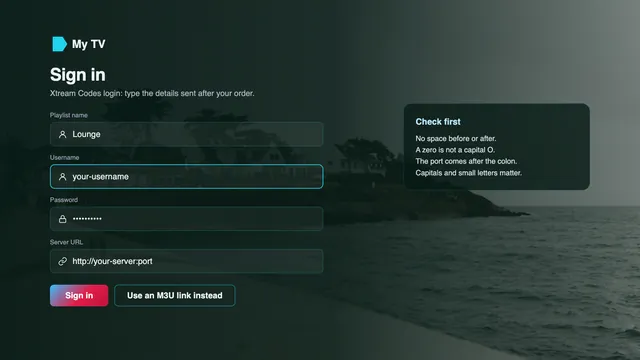
On each screen, pick the Xtream Codes option in your player and copy in three lines: username, password, server URL. Stuck? The team walks you through it in the same conversation.
Why a conversation and not a checkout? Someone on the team looks at every order before sending any link to pay. Mention a Fire TV Lite, an Apple TV HD or a 15 Mb/s line, and you learn what that means for 4K before any money moves.
The team works 24/7, so an order at 2 am goes through like one at 2 pm. What appears on your bank statement is decided by the payment company, not by us; ask, and the team will tell you the wording before you pay.
Your login
Your 4K IPTV login arrives about 2 minutes after payment, by WhatsApp or email. Real details appear only in your own message; the card on the right is masked.
One short message holds everything your players need. Keep it: a new television, a reset stick or a reinstalled app all need the same lines typed again.
Your login message, 2 minutes after payment
Masked here: your real details come only in your own message.
Devices
Any compatible player reads the login. No app is ours and we sell no hardware, so the device you already own decides how much of the 4K chain is in place. Pick its family.
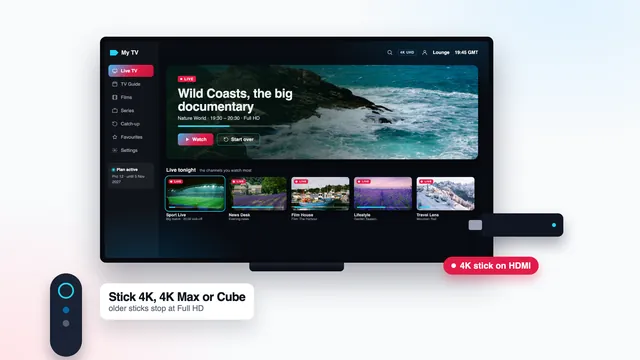
Three Amazon devices send out 4K: the Fire TV Cube, the Stick 4K and the Stick 4K Max, each passing HDR on when the stream carries it. The Lite and the plain basic stick go no higher than Full HD.
You will not find Smarters Pro in Amazon’s Appstore. Add Downloader (by AFTVnews) from the Appstore, then, in the Developer options of Settings › My Fire TV, allow it to install unknown apps. The link to type comes with your login.
Open Settings › My Fire TV › About and click the device’s name seven times; the menu then appears.
Vega OS, found on some of Amazon’s latest sticks, accepts Appstore apps only. Read the model before ordering a stick for 4K.
Outputs 4K with HDR. Players are installed from the App Store, the one source of apps on Apple’s box.
The older box tops out at 1080p. It opens the login without trouble but can never show a 4K picture.
Both switches live under Settings › Video and Audio › Match Content: Match Dynamic Range and Match Frame Rate. With them on, a 50 fps match and an SDR channel reach the TV as sent.
Made by Tech Smarters Private Limited, Smarters Pro is free to install, with an optional in-app Premium. Copycat apps exist, so check the maker’s name.
Whether Smarters Pro is offered depends on model and country. Samsung supports HDR10+ but not Dolby Vision.
The same store rule applies. Dolby Vision is supported on LG’s OLED and QNED ranges.
Activate Smart IPTV once on each set; its website then sends the playlist to the TV’s MAC address. IBO Player pairs the list with the MAC address, or with a device key instead.
Players come from Google Play, among them TiviMate, free with paid premium options. If no app suits your set, a 4K stick on a spare HDMI input does the job.
Certification for Android TV or Google TV is the line to look for: it means Google Play plus security updates. Boxes without it, common on online marketplaces, often stay on old Android.
Memory of 2 GB or more, a wired network socket, Wi-Fi on the 5 GHz band, HEVC handled by the chip and 4K sent out at 60 Hz.
An APK swapped on a forum may hide malware. Stick to the copy in the box’s own store.
Whatever the listing calls it, a box is a player. The channels and the 4K groups come with the login.
Free VLC opens the M3U link on either. Smarters Pro also installs on Apple-silicon Macs, and Kodi works too once PVR IPTV Simple Client is enabled.
Google Play carries both Smarters Pro and VLC. Trying the login on a phone takes a minute and rules out typing errors before you turn to the TV.
Most phone and laptop screens are below 3840 × 2160, so a 4K stream is shown at the panel’s own size. It plays, but it cannot look like 4K.
| Device | Highest picture | HDR |
|---|---|---|
| Fire TV Stick 4K, 4K Max, Fire TV Cube | 4K (2160p) | When the source has it |
| Fire TV Stick Lite, basic stick | Full HD (1080p) | — |
| Apple TV 4K | 4K (2160p) | When the source has it |
| Apple TV HD | Full HD (1080p) | — |
| Samsung 4K TV | 4K (2160p) | HDR10, HDR10+ |
| LG OLED or QNED TV | 4K (2160p) | HDR10, Dolby Vision |
| Certified Android TV or Google TV box | 4K at 60 Hz if listed | Depends on the model |
Changing device brings no extra channels: every one, the 4K groups included, comes through the login. For the settings that hold a picture at 2160p, read the 4K IPTV Firestick guide, the Apple TV 4K guide and the guide for Samsung sets. Shopping for hardware? The specs a 4K box must have matter more than the price tag.
Help
Support comes from people, on WhatsApp and email, before you order and after. When a picture is not 4K, a few details tell them which link of the chain to look at.
On WhatsApp or at contact@4kiptv-premium.co.uk, in English, 24/7. Questions before you order are welcome: your TV model and a speed reading are enough to start.
Send the group or title, the time, a photo of the player’s info screen and one of the TV banner, your device model and a speed check taken on it. That pinpoints the link at fault.
The full price comes back if the login never reached you, or if no screen shows anything once the team has done what it can. Refunds go back to the same card or PayPal account.
| What happened | Refund? | Why |
|---|---|---|
| The login never arrived | Yes, the whole amount | Claim within 7 days of paying |
| No picture on any screen, after the team tried to help | Yes, the whole amount | The access failed in your home |
| You no longer want it | No | The login was delivered and works |
| 4K stutters on a line slower than 25 Mb/s, after the speed was explained before you paid | No | Full HD and HD still play on that line |
| Your TV or stick cannot output 4K, and that was explained before the sale | No | The streams play at the size your screen can show |
A login that works but meets a television without 4K is not a faulty login, and neither is a line that was already too slow when the team named the speed it needs. That is why the questions come before the payment.
Costs
The four 4K IPTV Premium plans next to prices seen on UK offers online on 5 November 2026 and a typical pay-TV contract, each brought down to a month and a day.
| Offer | Each day | Each month | You pay | Term |
|---|---|---|---|---|
| Our Pro 12 | 13p | £4.08 | £49 | 12 months |
| Our Pro 24 | 12p | £3.71 | £89 | 24 months |
| Our Pro 12 Duo (2 screens) | 22p | £6.58 | £79 | 12 months |
| Our Pro 3 | 32p | £9.67 | £29 | 3 months |
| One month on its own (offers online) | 23p to 72p | £6.99 to £22 | the same, every month | 1 month |
| A year on one screen (offers online) | 11p to 18p | £3.33 to £5.42 | £39.99 to £65, typically near £55 | 12 months |
| A year on two screens (offers online) | 26p to 27p | £8.00 to £8.33 | about £96 to £100 | 12 months |
| Pay TV by dish or cable, with sport and films | £1.97 or more | £60 or more | monthly, under contract | 18 or 24 months |
At the time of writing, a year on one screen sells for £39.99 to £65 on offers online, most near £55, and Pro 12 sits inside that range at £49. Month by month, you would pay £6.99 to £22 each time. Two screens for a year cost about £96 to £100, against £79 for Pro 12 Duo. Prices vary by seller.
Pay TV by dish or cable with sport and films commonly runs to £60 a month or more, under a contract of 18 or 24 months: £1,080 at the very least. That price usually includes the operator’s box. With a 4K IPTV plan you bring the screen, the player and the broadband, and Pro 24 covers two years for £89.
 13p a day on Pro 12
Low is not the same as fair. A year far below the range, or “lifetime” access for one small payment, rarely comes with a written end date or a refund rule you can quote.
Before you pay
Whoever sells you 4K IPTV, us included, can be held to the same short list. People asking which sellers offer real UHD are right to be careful, and each warning sign below has a written answer in the last column.
Ask any seller, ours included, what a 4K stream needs on your line and which of your devices will show it. A clear answer with numbers is worth more than a badge. Be wary, too, of a request to pay as if you were sending money to a friend: that payment type is for people you know, not for purchases.
When a paid-for service never arrives, the card issuer, debit or credit, can attempt a chargeback. Banks each set a deadline, commonly near 120 days, and want to see that you asked the seller first. As for Section 75 of the Consumer Credit Act, its reach is narrower: it covers credit-card purchases above £100, so plans under that sum fall outside it. Paying by PayPal? Read PayPal’s current terms for what its buyer protection covers.
Reviews
★★★★★
The picture quality is an important feature for me. I particularly enjoy watching content in high definition on my television.
★★★★★
A good variety of British and international channels. There are plenty of entertainment options to explore.
★★★★★
The sports selection is interesting, especially for football fans. I also enjoy the movie and documentary categories.
★★★★★
I like using IPTV Smarters on my television. The categories are easy to understand and the interface is straightforward.
★★★★★
The VOD section has a good range of films and series. There are different genres for everyone in the family.
★★★★★
A varied selection of international channels and entertainment. I particularly enjoy having different types of programmes available.
FAQ
Television sent over your broadband to a player app, with a 3840 × 2160 picture on the channels and titles produced at that size. With 4K IPTV Premium, the rest stays at its own HD or Full HD resolution, and the player’s info screen shows which one you are watching.
No, and no seller can make it so. A channel produced in Full HD stays Full HD, and a 4K television only upscales it. 4K plays on the channels, events and titles made in 4K; we give no count of them, because it changes with what is produced.
For television, yes: 4K UHD means 3840 × 2160, four times Full HD. Cinema 4K is slightly wider at 4096 × 2160. 8K is a different, much larger format, and no plan here sends it.
Each 4K screen wants around 25 Mb/s, steady; Full HD wants 10 and HD 5, measured on the playing device after 7 pm. Pro 12 Duo with two 4K screens needs about 50 Mb/s in total. A cable to the router is safest; otherwise keep the TV near the router and on its 5 GHz band.
Open the player’s info screen during playback and look for 3840 × 2160 or 2160p with HEVC. Then press Info on the TV remote: the banner should show the same size. If the two disagree, the device output, the HDMI port or the cable is holding the picture back.
Three: the Fire TV Cube, the 4K Max stick and the Fire TV Stick 4K, each with HDR when the source has it. The basic and Lite sticks are limited to 1080p. Some new sticks use Vega OS, which takes Appstore apps only, so read the model name before you order one.
Yes, when three things line up: a programme made in HDR, a player that hands it on and a TV that knows the format. Samsung covers HDR10 and HDR10+, without Dolby Vision; LG’s OLED and QNED sets add Dolby Vision.
Pro 3 is £29 for 3 months and Pro 12 £49 for a year. Pro 12 Duo, for two screens at once, is £79 a year, and Pro 24 is £89 for two years. Each is paid once by card or PayPal, and nothing renews.
Count on about 2 minutes from the moment the payment clears, at any hour, in WhatsApp or your inbox. Ordered by email and nothing came? Look in junk mail, then reply in the same thread.
Guides
Ten guides, one question each: what UHD really means, bitrate, bandwidth, Firestick, Apple TV, Samsung sets, boxes, player apps, the playlist and football at 50 fps.
 4K guide
 4K guide
 4K guide
Twelve months of 4K IPTV on one screen, 13p for each day, 4K wherever the source is 4K. Ordered on 5 November 2026, it runs until 5 November 2027 and then simply stops, with nothing charged. The login reaches you about 2 minutes after you pay.
Pro 12: £4912 months · £4.08 a month
Order