4K guide
4K IPTV bandwidth: how many Mb/s each screen really needs
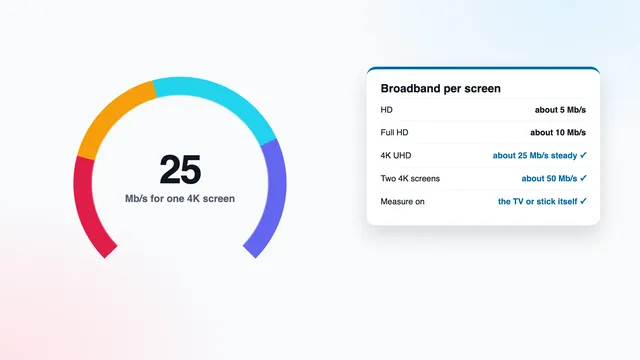
4K IPTV bandwidth is the speed your connection must deliver, steadily and at the screen itself, for a UHD picture to play without pauses: about 25 Mb/s for every screen showing 4K. This guide adds the figures up for a whole household, shows how to measure on the television rather than the phone, explains the evening peak and the Wi-Fi choices, works out the data used per hour, and lists what to do when the line falls short.
How many Mb/s each picture level needs
| Picture | Speed to hold at the device | Pixels per frame | Typical sources |
|---|---|---|---|
| HD | 5 Mb/s or so | 0.9 million | older and smaller channels |
| Full HD | 10 Mb/s or so | 2.1 million | most live channels and much of the film library |
| 4K UHD | 25 Mb/s or so | 8.3 million | channels and titles produced in 4K |
| Two 4K screens | 50 Mb/s or so | 8.3 million on each | two pictures at once on Pro 12 Duo |
‘Steady’ matters more than the headline figure. A connection that averages 40 Mb/s but drops to 15 for a few seconds every minute will interrupt a 4K picture; a line that holds 28 Mb/s without dips will not.
The planning figures carry a margin over the stream itself. A 4K stream’s own data rate moves with the action and spends most of its time below 25 Mb/s; the margin absorbs its peaks and the small stalls every network has. The guide to 4K bitrate explains what those megabits carry and why they vary.
Megabits and megabytes
Broadband is sold in megabits per second (Mb/s). Game consoles and download managers often show megabytes per second (MB/s), which are eight times bigger. So 25 Mb/s is about 3 MB/s, and a console downloading at 3 MB/s is using a whole 4K screen’s worth of your line.
4K IPTV bandwidth for two screens and a busy household
Speeds add up. Each screen playing at the same moment takes its own share, so the 4K IPTV bandwidth your home needs is the sum of what is on at once:
- a single 4K picture: about 25 Mb/s;
- 4K in the lounge plus Full HD in a bedroom: about 35 Mb/s;
- two pictures in 4K together, which Pro 12 Duo allows: about 50 Mb/s;
- two Full HD pictures: about 20 Mb/s.
Then add whatever else runs at that hour: a video call takes a few megabits each way, phones back up photos, a laptop syncs files. Large downloads are the real danger, because they take every megabit they can find; a console update of tens of gigabytes can starve a 4K stream on its own. Many routers let you give the TV priority (often called QoS or device priority), and most consoles can schedule updates for the small hours.
Before choosing Pro 12 Duo for two 4K pictures, check that the line holds about 50 Mb/s at the TVs in the evening. If it holds 35, the same plan still works with one screen in 4K and the other in Full HD.
Measure on the television or stick, not on your phone
A reading on your phone beside the router describes the router. The only number that matters is the one taken on the device that plays the stream, in the place where it actually sits.
- Find a speed-check app in the TV’s or stick’s app store, or open a speed-check website in a browser on that device. On Fire TV, a browser from the Amazon Appstore does the job; on Android TV and Google TV, use an app from Google Play.
- Pause other heavy use in the house for the reading: downloads, other TVs, cloud backups.
- Run the check three times, a few minutes apart, and note the lowest download figure rather than the best.
- Repeat on a weekday evening between 19:00 and 23:00, and once on a big match night if you watch live sport.
- Compare the lowest evening reading with the table: it should clear about 25 Mb/s for each screen you want in 4K.
Some sets cannot run a speed-check app at all. In that case, play a 4K programme in the evening: if it runs for twenty minutes without a single pause, the connection is keeping up with that stream. Ping, the delay figure most checks also show, matters little for watching television; a steady download speed is what counts.
The evening peak, 19:00 to 23:00
Home internet in the UK peaks between roughly 19:00 and 23:00, and Saturday or Sunday evenings and nights with a big fixture push it higher still. At those hours, three loads stack up. Your neighbours share the same street equipment and local network. Everyone in your own household is online. And the servers that send the streams carry their heaviest load; on our side, several servers share it at peak hours.
A line that gives 45 Mb/s at ten in the morning can give noticeably less at nine at night. A morning reading tells you very little; measure when you actually watch.
Every live stream lags the broadcast slightly, usually by anything from a few seconds to about thirty, and that cushion absorbs short dips in speed. A long dip still shows: the picture stops while the buffer refills, then carries on from where it paused.
Wi-Fi at 2.4 GHz, Wi-Fi at 5 GHz, or a cable
How the television joins the network often decides more than the speed of the line itself.
| Connection | Strengths | Weak points | For 4K |
|---|---|---|---|
| Ethernet cable | full line speed, no interference, steady at peak times | needs a cable run to the TV | the first choice |
| 5 GHz Wi-Fi | fast, less crowded | weakens through walls and floors | good close to the router, one wall away at most |
| 2.4 GHz Wi-Fi | reaches further | slower, crowded by neighbours' networks, microwaves and Bluetooth | fine for HD, often short for 4K |
| Mesh or powerline | brings the network to a distant room | real speeds well below the figure on the box | check on the TV once it is set up |
Many routers broadcast both Wi-Fi bands under one name and let each device pick. Televisions far from the router tend to cling to 2.4 GHz. If your router allows it, give the 5 GHz band its own network name and connect the TV to that one; the TV’s network status screen usually says which band or frequency it is using.
Placement helps more than people expect. A router inside a cupboard, behind the television or at floor level loses a good part of its reach. Raised and in the open, it serves the lounge far better.
The 100 Mb/s port on many televisions
Many TVs and some boxes have an Ethernet socket capped at 100 Mb/s, known as Fast Ethernet. A speed check over that cable will never read more than about 94 Mb/s, even on a much faster line, which worries some owners. It should not: a 4K picture needs about 25 Mb/s, and a cable that delivers a steady 94 beats a Wi-Fi link that peaks higher but wavers in the evening.
Sticks without a socket
Fire TV sticks have no Ethernet socket of their own. Amazon sells an Ethernet adapter for its sticks; check that it matches your model before ordering one. The Fire TV guide covers which sticks output 4K at all.
When the router is far away: mesh and powerline
A mesh system adds one or more units between the router and the television and joins them into a single network. Place the unit where it still receives a strong signal from the router: halfway along is better than right beside the TV in a weak spot. If the units can be joined by a cable, called wired backhaul, the TV gets close to the full speed of the line.
Powerline adapters carry the network over the mains wiring: one adapter next to the router, another next to the TV, linked to it by a short Ethernet cable. Plug each one straight into a wall socket rather than an extension lead or a surge-protected strip, and expect real speeds well below the figure printed on the box. Old wiring, separate circuits and busy appliances all cut the result.
A basic single-band range extender listens and repeats on the same channel, so it can halve the speed it passes on. For 4K, mesh or powerline usually does better.
Whatever you add, run the evening speed check on the television again afterwards. The figure on the TV is the only proof that the change worked.
Data use per hour and per month
Most fixed home broadband in the UK comes without a data cap, and if yours is one of them you can skip this section. It matters on mobile broadband, on a 4G or 5G home router, or when the TV runs from a phone’s hotspot.
The figures come straight from the speeds. One megabit per second for an hour is 3,600 megabits, which is 450 megabytes. Multiply by the planning speed and you have the most an hour can use:
| Picture | One hour, at most | Three hours a night for 30 days | Worked out as |
|---|---|---|---|
| HD | 2.25 GB | about 200 GB | 5 × 450 MB |
| Full HD | 4.5 GB | about 405 GB | 10 × 450 MB |
| 4K UHD | 11.25 GB | about 1 TB | 25 × 450 MB |
| Two 4K screens | 22.5 GB | about 2 TB | 50 × 450 MB |
These are upper limits. A stream’s real data rate stays under the planning figure most of the time, so actual use is usually lower. On a capped connection, check your allowance against the right-hand column before settling into a 4K habit.
When your line cannot carry 4K
Plenty of UK homes, on older copper lines or a long way from the street cabinet, cannot hold 25 Mb/s at the TV in the evening. That is no reason to give up on a good picture. A Full HD picture asks for around 10 Mb/s and, from an ordinary sofa distance, looks close to 4K on most screen sizes; the guide to IPTV 4K Ultra HD and viewing distance shows where the difference starts to appear. Practical steps, roughly in order of payoff:
- Pick the FHD line of a channel when both are listed, and keep 4K for the hours when your measured speed allows it.
- Wire the TV. Moving from a distant Wi-Fi link to Ethernet or powerline often recovers more speed than a new broadband deal.
- Quieten the house during big events: pause downloads, console updates and cloud backups.
- Talk to your broadband company about a faster package only after measuring on the TV. If Wi-Fi is the bottleneck, a faster line changes nothing in the lounge.
The plan you choose does not change the speed you need, since all four carry the same picture levels and each screen draws only what its picture requires. Pro 3, 3 months for £29, is the short way to see how your own line copes in the evening; the suggested plan, Pro 12, costs £49 for a year; Pro 24 brings the monthly price down to £3.71. Compare them on the page listing the 4K IPTV plans or order straight from the home page plan cards.
Measure before you order. The 7-day refund is there for two cases only: no login ever reaches you, or nothing will play on any of your screens after the team has helped. A line too slow for 4K is not one of them, since these speeds are published before you pay; the refund policy page has the details. Once the login arrives, the step-by-step 4K setup takes you from the message to a playing picture, and the 4K IPTV checklist on our home page sums up the whole chain on one card.
Frequently asked questions
Is 25 Mb/s broadband enough for 4K?
For one 4K screen, yes, provided about 25 Mb/s actually reaches the TV and holds through the evening. A 30 Mb/s line that delivers 18 over Wi-Fi is not enough; the same line over a cable may well be.
How much 4K IPTV bandwidth do two televisions need?
About 50 Mb/s for two 4K pictures at once, measured at the TVs. With around 35 Mb/s, Pro 12 Duo still works with one screen in 4K and the other in Full HD.
Should I measure the speed on my phone or on the TV?
On the TV or stick that plays the stream, where it actually sits. A phone beside the router can read twice what reaches the lounge.
Why does 4K pause in the evening but not in the afternoon?
Between about 19:00 and 23:00, local networks, households and servers are all at their busiest, so the speed at the TV drops. Measure during those hours and, if the reading is short, wire the TV or switch to the FHD line.
Is a 100 Mb/s Ethernet port fast enough for 4K?
Yes. It delivers up to about 94 Mb/s, nearly four times what one 4K picture needs, and a cable holds its speed far better than Wi-Fi at peak times.
How much data does an hour of 4K use?
At most about 11.25 GB at 25 Mb/s, and usually less because the stream’s own rate varies below that. This matters only on a capped connection such as mobile broadband.
What if my line is too slow for 4K?
Watch the FHD lines, which need about 10 Mb/s and look sharp from a normal sofa distance. Measure before ordering: the 7-day refund does not cover a line too slow for 4K.