4K guide
4K IPTV Box: The Spec Sheet Behind a Real 4K Picture
A 4K IPTV box is only as capable as the weakest line on its spec sheet: the signal it sends to the TV, the chip that decodes HEVC, its memory, its network port and the system it runs. This guide reads that sheet line by line, explains why an Android TV or Google TV certificate says more than a « 4K » sticker, shows why a box sold « with channels » adds nothing a login does not, and helps you decide whether you need a box at all.
What a 4K IPTV box does in the chain
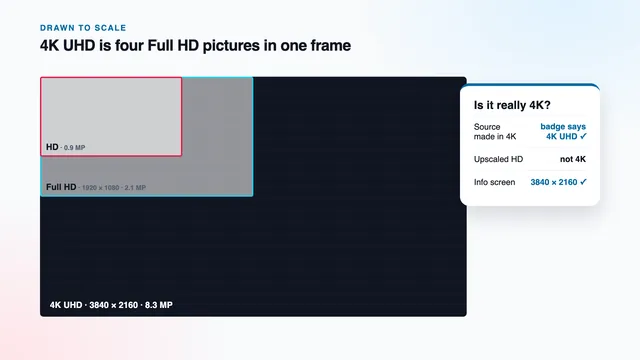
Think of the box as the decoder between your broadband and your television. It takes in a compressed stream, rebuilds each frame and sends the result down the HDMI cable. It cannot improve what arrives: a Full HD programme stays Full HD, even when the box stretches it across all 3840 × 2160 pixels of the panel.
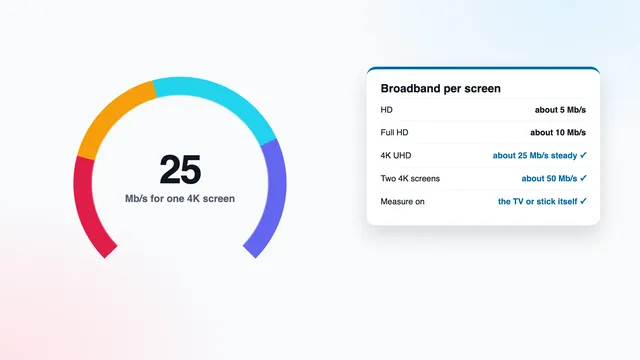
So the box is one link in a chain of five: a source made in 4K, roughly 25 Mb/s of steady broadband per 4K screen, hardware HEVC decoding, an HDMI 2.0 connection and a 4K panel. A weak box breaks the third or fourth link; a strong one cannot repair the first two. That is why our page on what Ultra HD really means starts with the source, and why 4K IPTV at 4K IPTV Premium is described as 4K only where the programme itself is.
The spec sheet, line by line
A 4K IPTV box listing is written to sell, and the « 4K » on the front is its least useful word. Read the technical sheet instead. When a line below is missing from the listing, treat it as missing from the box.
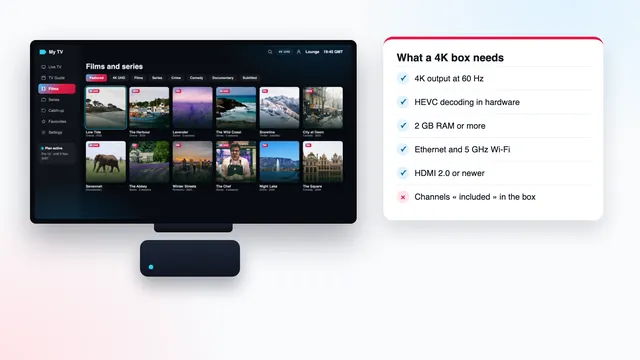
| Line on the sheet | What a 4K box needs | Warning sign |
|---|---|---|
| Video output | 3840 × 2160 at 60 Hz, with 50 Hz available for UK programmes | « 4K » with no refresh rate, or 4K at 30 Hz only |
| Video decoding | HEVC (H.265) Main 10 in hardware; VP9 and AV1 in hardware as a bonus | No codec list, or « H.265 » with no word on hardware |
| HDR | HDR10 and HLG at least; HDR10+ or Dolby Vision to suit your TV | « HDR » with no format named |
| Memory (RAM) | 2 GB at the very least; 3 or 4 GB leaves room | 1 GB, or a figure that differs between the photos and the text |
| Storage | 8 GB or more, so players and their caches fit | So little space that the first updates fill it |
| Ethernet | A wired RJ45 port; even 100 Mb/s is four times one 4K stream | No port on a box meant for the lounge |
| Wi-Fi | 5 GHz (Wi-Fi 5 or Wi-Fi 6) | 2.4 GHz only |
| HDMI | HDMI 2.0 or newer | HDMI 1.4, or no version given |
| System | Certified Android TV or Google TV with recent security patches | Phone-style Android with a TV launcher laid on top |
Output: 60 Hz for menus, 50 Hz for British television
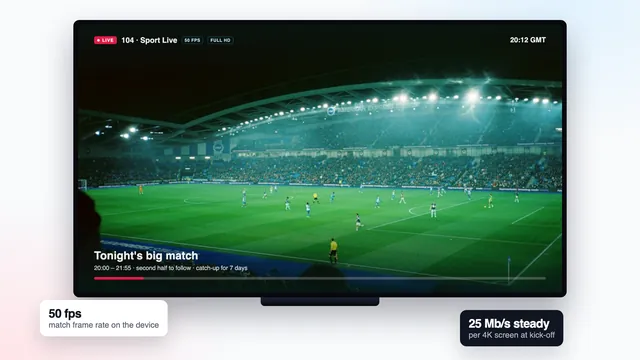
A box limited to 2160p at 30 Hz will play a film, but menus feel sluggish and live sport loses its fluid motion. Look for 2160p at 60 Hz, then check the box can also drop to 50 Hz, the rate British and European television is made at. A setting that matches the output to each programme’s frame rate does that by itself. Without it, football produced at 50 frames a second is pushed into 60 Hz, one frame in five is shown twice, and slow pans across the pitch judder.
Decoding: HEVC in hardware, and 10-bit
4K streams are mostly compressed with HEVC, also called H.265, which needs up to about half the bitrate of the older H.264 for a comparable picture. A hardware HEVC decoder unpacks it in a dedicated block of the chip, cool and quiet. A box that leaves the job to its main processor drops frames, lets the sound drift ahead and runs hot.
For HDR, the sheet should also say « Main 10 » or « 10-bit ». VP9 and AV1 matter less for live channels, but a chip that decodes them in hardware is usually a recent design, which bodes well for the rest of the sheet.
Memory and storage
With 2 GB of RAM, a player can hold a 4K buffer and a week of guide data; with 1 GB, apps are closed in the background and the guide reloads each time you return. Updates and caches eat storage, so treat 8 GB as a floor.
HDMI 2.0, the cable and the right TV input
2160p at 60 frames a second with HDR needs up to 18 Gb/s across the HDMI link, which is what HDMI 2.0 was built for; HDMI 1.4 stops at 4K at 30 Hz. The version has to hold at both ends and along the cable.
- Box: HDMI 2.0 (its 2.0a and 2.0b revisions add HDR signalling) or 2.1.
- Cable: a lead certified « Premium High Speed » or « Ultra High Speed ». An older « High Speed » lead may cope at 30 Hz and fail at 60 Hz with HDR, so the picture blacks out for a second and returns.
- TV: some sets give full bandwidth on only one or two inputs, and many keep it off until you enable an enhanced HDMI mode for that input, under a name that differs between makers.
- In between: a soundbar, AV receiver or HDMI switch must pass 4K at 60 Hz too, or the box drops to 1080p without a message.
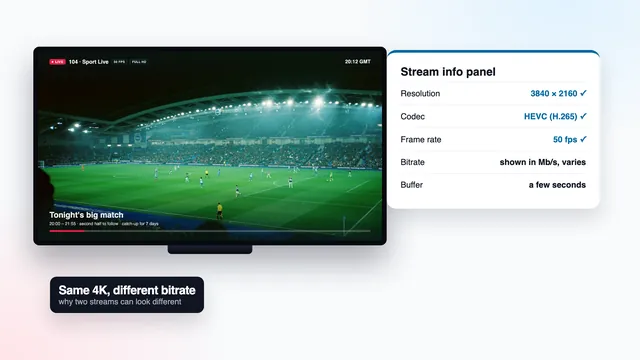
Press info on the TV’s own remote while the box is on screen: the banner should read 3840 × 2160 at 50 or 60 Hz. That proves the link, not the programme, because the box sends 2160p even while it scales up a Full HD channel. The player’s info panel settles that, as the guide to 4K player apps and their settings shows.
HDR formats: match the box to your television
HDR stretches the distance from the deepest black to the brightest highlight, and it needs three conditions at once: a source mastered in HDR, a box that passes the format and a TV that reads it. Miss one and you get standard dynamic range, which looks normal. A box set to force HDR on everything is worse, because it stretches ordinary pictures until skin tones and whites look wrong.
| Format | Where you meet it | What the box must handle |
|---|---|---|
| HDR10 | The base layer of nearly every HDR title | 10-bit HEVC with static HDR data |
| HLG | Live programmes made in HDR, some sport among them | Recognise HLG and switch the TV into HDR |
| HDR10+ | Some films and series; Samsung TVs support it | HDR10+ if your TV is a Samsung, which has no Dolby Vision |
| Dolby Vision | Some films and series; LG OLED and QNED sets support it | Dolby Vision if your TV has it; otherwise HDR10 usually plays instead |
So pick the display option that follows the content (often « match content » or « adaptive ») rather than « always HDR ». A missing HDR badge on a title you expected in HDR is then the first clue that a link is absent.
Network: a cable first, 5 GHz Wi-Fi second
Each 4K screen draws roughly 25 Mb/s, and the figure that counts is the one the box itself measures at the TV. Steady matters more than peak: a line averaging 60 Mb/s that sinks to 15 for a few seconds each minute stalls a 4K picture that a slower, flatter line plays cleanly.
That is why the Ethernet port earns its place. Even a 100 Mb/s port has four times the headroom one 4K stream needs, and a cable ignores walls and neighbouring networks; powerline adapters or a mesh point with its own socket bring the wire to a TV far from the router. Without a cable, the box must have 5 GHz and sit close to the router, ideally in the same room. 2.4 GHz is crowded, and between about 19:00 and 23:00 it is the usual reason a box that plays 4K at lunchtime stutters at night. Our 4K bandwidth guide covers measuring the line and running two screens at once.
Certified Android TV or Google TV, or an uncertified box
Most « IPTV boxes » on online marketplaces are Android boxes, in two groups. Certified ones run Android TV or Google TV as Google approves it, with Google Play, Play Protect scanning and security updates. Uncertified ones run an Android build meant for phones, often several versions old, with a TV launcher added and no updates planned.
For 4K this goes beyond the list of apps. On a certified box, players from Google Play reach the hardware decoder through the standard route, so HEVC and HDR behave as the chip intends. On an uncertified one, a player may slip back to software decoding without telling you, and frame-rate matching or a proper HDR mode may be missing.
How to tell the two apart
- The box and its listing show the Android TV or Google TV name and logo, not just « Android ».
- Google Play is on the home screen from the first start, and its settings report the device as Play Protect certified.
- The About screen (Settings › System › About on Google TV, Settings › Device Preferences › About on Android TV) shows a recent version and a security patch that is not years old, whatever the listing printed.
- Warning signs: a phone-style home screen, an app store you have never heard of, or preinstalled apps whose icons promise channels.
Amazon’s Fire TV devices are a third group: Fire OS and Amazon’s own Appstore, not Google Play. Three models output 4K, namely the Cube and the two 4K sticks (4K and 4K Max), each with HDR when the programme carries it; the Lite and the basic stick top out at 1080p. Vega OS, found on a handful of Amazon’s newest sticks, accepts Appstore apps and nothing else, so confirm the model and your player’s availability before paying. The Fire TV guide for 4K pictures goes through those devices.
Boxes sold « with 4K channels »: what the listing really sells
Search a marketplace for a 4K IPTV box and many listings promise more than hardware: « loaded », « 12 months included », « thousands of 4K channels ready to watch ». The device is a generic Android box, and whatever channels it shows come from a login somebody typed into a player before posting the parcel.
A box adds nothing to the channels. The access is the login, which works identically in any compatible player on any capable device. Paying for the bundle buys that login without what you would demand if it were sold alone: who issued it, an end date in writing, a refund window counted in days, and someone who answers questions before the sale.
Our plans are sold the other way round: access only, with no hardware. Pro 12 costs £49 for 12 months, paid once, with the end date written in the login message; Pro 12 Duo covers two screens at the same time for £79, and Pro 24 brings the monthly cost down to £3.71. The 4K plans compared side by side shows all four with their dates, and the plan cards on the home page open the order in WhatsApp.
When you do not need a box at all
A 4K IPTV box is worth buying when it supplies a missing link. When nothing is missing, it only adds another remote to the coffee table.
| What you already have | Do you need a box for 4K? |
|---|---|
| A 4K TV running certified Google TV or Android TV | Usually not: install a player from Google Play on the TV and check its info panel on a 4K title |
| A Samsung or LG 4K TV | Often not: many models run IBO Player or Smart IPTV; a box helps when the player you prefer is missing |
| An Apple TV 4K | No: install a player from the App Store and turn on Match Content |
| A Fire TV Cube, Stick 4K or Stick 4K Max | No, provided the model can install the player you choose |
| A Fire TV Stick Lite or basic stick | Yes for 4K: these stop at Full HD |
| A Full HD TV | No box helps: the panel has 1920 × 1080 pixels, so the TV itself is the missing link |
| A 4K TV whose apps no longer get updates | Yes: a certified box or a 4K stick brings current apps and decoders |
Two of those rows have guides of their own: 4K on Apple TV, with Match Content and 4K on a Samsung TV, app by app. The same login opens on every screen, so you can start with the TV you have and add a box only if the info panel shows a gap.
The first-evening check on a new box
Whether the 4K IPTV box is new or has sat under the TV for years, these checks take about ten minutes and show which link, if any, is weak.
- Open the About screen and note the system version and the security patch date. A patch several years old points to an uncertified or abandoned box.
- In the display settings, set the output to 2160p, then turn on frame-rate matching and the dynamic-range option that follows the content.
- Press info on the TV remote. The banner should read 3840 × 2160 at 50 or 60 Hz.
- Run a speed check on the box itself, on the connection you will use in the evening: 25 Mb/s that holds, not one high peak.
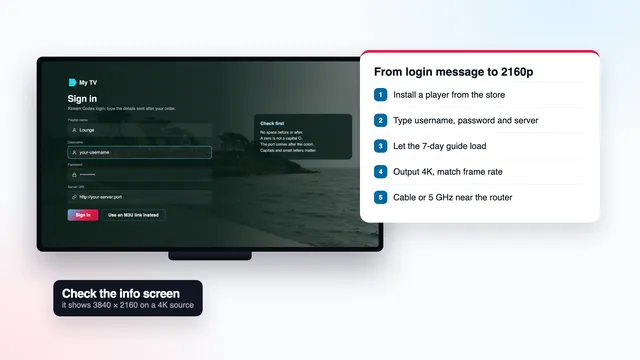
- Install a player from the box’s own store and enter the three login lines (username, password, server URL) from your message. The 4K setup steps show each screen.
- Play a channel or title from a 4K group and open the player’s info panel. 3840 × 2160 and HEVC confirm that the box is doing its share.
If a step fails for no obvious reason, send the result of each step to the team through the contact page. The team answers 24/7 in English, and a screenshot of the info panel settles most questions fast.
Frequently asked questions
Will a 4K IPTV box make all my channels 4K?
No. Each channel arrives at the resolution it was made at: programmes produced in 4K reach 4K UHD, the rest stay HD or Full HD. The box may scale a Full HD picture to fill the panel, but scaling adds no detail, and the player’s info panel still reads 1920 × 1080.
Is a box better than a 4K streaming stick?
Not automatically. Amazon’s 4K Max stick, like the plain Stick 4K, decodes HEVC in hardware and outputs 4K with HDR when the programme has it. A box earns its place with an Ethernet port, more memory and more storage, and both rely on the same steady 25 Mb/s.
Will my login work on a box I bought years ago?
It will if the box can install a player that reads Xtream logins or M3U links: TiviMate, IBO Player, IPTV Smarters Pro, VLC, or Kodi with the PVR IPTV Simple Client. Whether that box shows 4K depends on the spec lines above. Pro 3, Pro 12 and Pro 24 each cover a single screen; Pro 12 Duo covers two at once.
My box says 2160p but the picture looks soft. Why?
The 2160p in the settings describes what the box sends to the TV, not the programme. A Full HD channel scaled to 2160p looks softer than true 4K. If the player’s info panel reads 3840 × 2160 and the picture still looks soft, the 4K bitrate guide explains what to look at next.
What happens when access sold with a box stops?
The box keeps working; only the login has ended. You can type a new login into the same player. With us, a new order brings a new login message with its own end date.